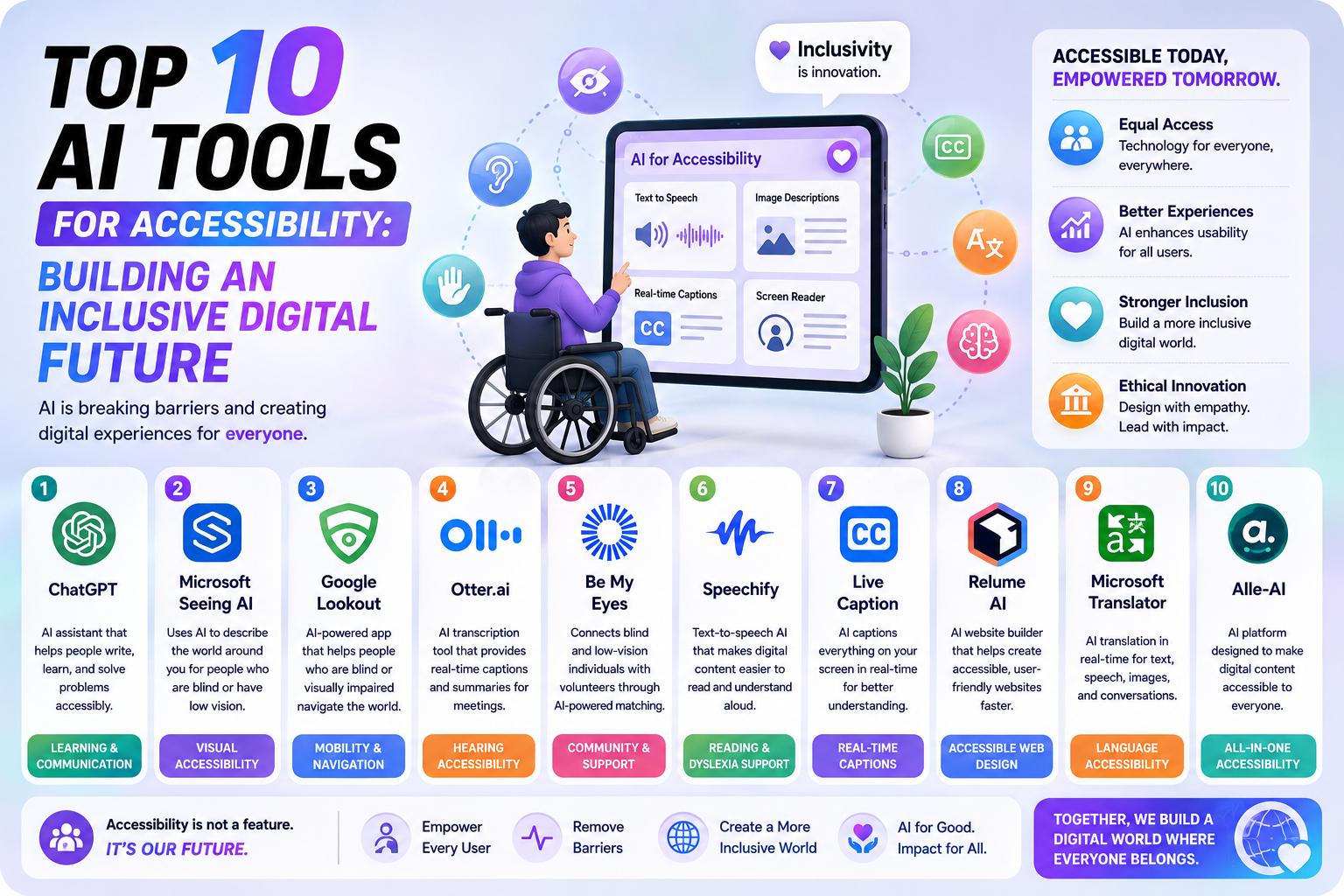
In today’s digital-first economy, web accessibility is no longer an optional feature or a post-launch afterthought—it is an essential requirement. Over one billion people worldwide live with some form of disability, ranging from visual, auditory, and motor impairments to cognitive and neurodivergent conditions. Creating digital products that accommodate every user is not only a ethical imperative, but it is also a legal necessity under regulations such as the Americans with Disabilities Act (ADA) and the European Accessibility Act (EAA).
Artificial Intelligence (AI) has dramatically transformed the digital accessibility landscape. Rather than relying solely on manual audits or rigid rule-based scanners that catch only a fraction of code violations, modern multimodal AI platforms can dynamically analyze visual interfaces, interpret complex user interactions, auto-generate accurate screen reader descriptions, and simplify text in real time.
Whether you are a web developer, product designer, marketer, or enterprise business leader, leveraging the right tools can streamline WCAG (Web Content Accessibility Guidelines) compliance and create delightful experiences for every user. Here is an in-depth breakdown of the Top 10 AI Tools for Accessibility driving the future of inclusive technology.
1. Be My AI (Powered by Be My Eyes)
-
Best For: Real-time conversational visual assistance for blind and low-vision users.
-
Primary Category: Computer Vision & Personal Assistive Technology.
Overview
Integrated into the acclaimed Be My Eyes mobile application, Be My AI utilizes advanced multimodal artificial intelligence (powered by OpenAI’s GPT-4 Vision model) to describe physical and digital environments to blind or low-vision users.
Unlike traditional screen readers that merely read text embedded in digital code, Be My AI analyzes photos taken by the user’s camera or uploaded screenshots. Users can engage in a conversational back-and-forth dialogue to ask specific questions about what the image contains.
Key Capabilities
-
Interactive Visual Q&A: Users can snap a photo of a restaurant menu, a street sign, or an unlabelled computer screen and ask follow-up questions like, “Is the second option vegetarian?” or “Where is the exit door relative to me?”
-
Human-in-the-Loop Safety: If the AI is uncertain about a complex detail, it instantly offers a seamless transition to connect the user with a live sighted volunteer.
-
Scene and Spatial Analysis: Identifies object placement, color combinations, text formatting, and navigational hazards.
2. Stark
-
Best For: Proactive accessibility testing inside design environments like Figma, Adobe XD, and Sketch.
-
Primary Category: UI/UX Design & Developer Workflow Integration.
Overview
Fixing accessibility bugs during production or after deployment is notoriously expensive and time-consuming. Stark brings artificial intelligence right into the design room, embedding directly into popular design applications.
Stark’s AI suite continuously scans design files, wireframes, and prototypes, identifying potential accessibility hurdles before a single line of code is written.
Key Capabilities
-
Automated Alt Text Generation: Uses vision models to analyze design mockups and write contextual image descriptions automatically.
-
Smart Contrast & Color Analysis: Calculates color contrast ratios against WCAG 2.1/2.2 AA and AAA standards, suggesting accessible color palettes automatically.
-
Vision Simulator & Focus Order: Simulates multiple vision conditions (such as protanopia, deuteranopia, and blurred vision) while mapping logical keyboard navigation tab stops.
3. accessiBe (accessWidget & accessScan)
-
Best For: Automated AI website remediation and web accessibility overlays.
-
Primary Category: Front-End Automation & Web Compliance.
Overview
accessiBe is one of the most widely used AI-driven platforms for automated website accessibility. Its flagship product, accessWidget, runs unobtrusively in the background of a website, utilizing machine learning to adapt the site’s DOM (Document Object Model) dynamically for assistive technologies like screen readers and keyboard navigation.
Key Capabilities
-
Contextual Screen Reader Optimization: Uses computer vision and OCR to adjust ARIA (Accessible Rich Internet Applications) attributes, landmarks, and form labels without altering original code.
-
Keyboard Navigation Adjustments: Automatically remediates dropdown menus, popups, forms, and skip-links to ensure full keyboard navigability.
-
User-Facing Accessibility Interface: Provides visitors with an customizable interface menu to adjust font sizes, color contrasts, animations, and focus highlights according to their individual needs.
4. UserWay
-
Best For: Enterprise-grade site monitoring, AI remediations, and legal compliance tracking.
-
Primary Category: Automated Web Accessibility & Audit Monitoring.
Overview
UserWay leverages computer vision and machine learning algorithms to continuously scan, monitor, and fix accessibility violations across large-scale websites. It provides an end-to-end management portal that enables digital teams to track WCAG 2.2 compliance scores across thousands of web pages simultaneously.
Key Capabilities
-
Continuous AI Site Auditing: Detects structural issues, broken links, missing alt tags, and color contrast violations continuously.
-
AI Auto-Fix Engine: Automatically injects code fixes for missing headings, broken tab flows, and unlabeled interactive elements in real time.
-
Multilingual Accessibility Controls: Provides instantaneous translation and screen reading support across over 40 languages.
5. AudioEye
-
Best For: A hybrid approach combining automated AI detection with certified human accessibility expert remediation.
-
Primary Category: Hybrid AI Accessibility Management.
Overview
While pure automation can address a significant portion of technical WCAG errors, complex user journeys often require nuanced human judgment. AudioEye bridges this gap by combining patented AI automation with dedicated human auditors. Its AI agent fixes common issues instantly, while human experts handle complex custom widgets and workflow barriers.
Key Capabilities
-
Active Protection Engine: Automatically detects and resolves up to 40% of WCAG violations before a page fully renders in the user’s browser.
-
Human-Verified Custom Fixes: Connects your development pipeline with human accessibility specialists who manually verify complex interactions (e.g., multi-step checkout funnels).
-
Legal Defense & Compliance Certification: Offers active legal protections and detailed accessibility compliance documentation.
6. EvinceAI (and Deque axe DevTools AI)
-
Best For: Developer-centric accessibility testing within modern CI/CD software pipelines.
-
Primary Category: Automated QA Testing & Developer Accessibility.
Overview
For engineering teams committed to “Accessibility-as-Code,” tools like EvinceAI and Deque axe DevTools AI represent the gold standard in modern software development. Built on top of industry-standard rules engines like axe-core, these tools integrate artificial intelligence to eliminate false positives and reason through complex UI states during automated continuous integration (CI) tests.
Key Capabilities
-
Intelligent Issue Triage: AI agents evaluate custom UI components—such as modal focus traps and single-page application route transitions—to verify semantic correctness.
-
Automated Pull Request Checks: Evaluates code before it hits production, commenting directly on GitHub pull requests with recommended remediation snippets.
-
Zero-Flake Automated Testing: Filters out transient visual glitches to deliver precise, actionable developer reports.
7. Read Easy AI
-
Best For: Improving content comprehension for neurodivergent users and people with cognitive disabilities.
-
Primary Category: Cognitive Accessibility & Plain Language Processing.
Overview
Digital accessibility is not limited to physical or visual sensory impairments; cognitive accessibility is equally important. Read Easy AI focuses on content readability, utilizing advanced Large Language Models (LLMs) to automatically simplify complex, dense, or overly jargon-heavy text into clear, easy-to-understand language.
Key Capabilities
-
Text Simplification Engine: Rewrites complex technical, legal, or medical prose to align with CEFR reading levels or plain language standards without losing core meaning.
-
Dyslexia-Friendly Layout Adjustments: Modifies line spacing, font structures, and paragraph lengths to reduce cognitive overload for dyslexic readers.
-
Multilingual Reading Assistance: Adapts simplified text across multiple global languages for non-native speakers.
8. Voiceitt
-
Best For: Speech recognition tailored for non-standard speech patterns and speech disabilities.
-
Primary Category: Voice AI & Alternative and Augmentative Communication (AAC).
Overview
Standard speech-to-text models (like basic voice assistants) frequently fail when processing non-standard speech caused by conditions such as Cerebral Palsy, Stroke, ALS, Parkinson’s disease, or Traumatic Brain Injury. Voiceitt is an innovative AI platform specifically trained on diverse speech datasets to understand non-standard speech patterns accurately.
Key Capabilities
-
Personalized AI Speech Models: Learns and adapts to an individual’s unique vocal nuances, pronunciation habits, and speech rhythms over time.
-
Smart Home & Assistive Integration: Allows users with speech motor challenges to control smart home environments, communicate with family, or dictate text effortlessly.
-
Real-Time Translation to Standard Audio: Converts non-standard speech into clear, fluent spoken audio or structured text during phone or video calls.
9. Play.ht & Murf AI
-
Best For: Converting written digital content into natural, expressive, accessible audio.
-
Primary Category: Text-to-Speech (TTS) & Audio Generation.
Overview
For individuals with visual impairments, learning differences, or auditory preferences, reading long digital articles or technical documents can be taxing. Next-generation AI text-to-speech tools like Play.ht and Murf AI turn static text into hyper-realistic, human-sounding voice narration.
Key Capabilities
-
Context-Aware Voice Synthesis: Adapts intonation, pacing, and emotional tone based on sentence punctuation and context, avoiding robotic cadences.
-
Instant Blog & Document Audio Conversion: Generates downloadable or embeddable audio players for web pages, rendering content accessible on the go.
-
Diverse Voice Library: Offers hundreds of distinct voices across dozens of accents and languages to suit diverse user demographics.
10. Otter.ai & AirCaption
-
Best For: Live transcription, automated closed captioning, and real-time meeting notes for deaf and hard-of-hearing users.
-
Primary Category: Audio-to-Text & Real-Time Captioning.
Overview
For deaf and hard-of-hearing individuals, attending live virtual meetings, video conferences, or educational lectures requires immediate, reliable captioning. AI platforms such as Otter.ai and AirCaption utilize deep learning speech-recognition models to produce instant, accurate transcriptions with minimal latency.
Key Capabilities
-
Real-Time Automated Captioning: Transcribes live speech into text overlays during Zoom, Microsoft Teams, or Google Meet sessions.
-
Speaker Diarization: Accurately distinguishes between different speakers, labeling who is talking during group conversations.
-
Searchable Text Archives: Automatically generates searchable written summaries and key highlights after webinars or meetings conclude.
Feature Comparison Matrix
| AI Accessibility Tool | Core Target Audience | Best Deployment Stage | Primary Benefit |
| Be My AI | Blind & Low-Vision Users | Mobile / End-User | Natural conversational scene & image description |
| Stark | UI/UX Designers & Product Teams | Design & Wireframing | In-app contrast checks & alt-text generation |
| accessiBe | Website Owners & SMBs | Live Production Website | Dynamic screen reader & keyboard remediation |
| UserWay | Enterprise Web Teams | Live Production Website | Automated compliance auditing & site overlay |
| AudioEye | Regulated Enterprise Platforms | Continuous Deployment | Hybrid AI speed + human specialist auditing |
| EvinceAI | Frontend Engineers & QA Testers | CI/CD Code Pipelines | Shift-left accessibility testing in pull requests |
| Read Easy AI | Neurodivergent & Cognitive Users | Content Publishing | Automated text simplification & plain language |
| Voiceitt | Non-Standard Speech Speakers | Communication & Smart Home | Adaptive voice recognition for speech disabilities |
| Play.ht / Murf | Auditory Learners & Low-Vision Users | Content Distribution | High-fidelity text-to-speech audio rendering |
| Otter / AirCaption | Deaf & Hard-of-Hearing Users | Live Media & Virtual Meetings | Immediate live transcription & speaker tagging |
Best Practices for Implementing AI Accessibility Tools
While AI accessibility tools have drastically lowered the barrier to entry for digital inclusion, organizations should adopt a thoughtful implementation strategy:
-
Shift Left into Design and Development: Do not wait until a web product is fully launched to check for accessibility. Use design-stage tools like Stark and developer tools like EvinceAI early in the build cycle to catch errors at the source.
-
Combine Automation with Human Expertise: AI handles repetitive code audits and baseline pattern recognition exceptionally well. However, automated tools alone cannot substitute for real testing by users with disabilities. Always pair AI tooling with manual audits and user feedback loops.
-
Focus on WCAG 2.2 AA Conformance: Ensure that whatever AI platforms you deploy align directly with international web accessibility standards, such as WCAG 2.2 Level AA guidelines.
-
Prioritize Native Semantic HTML: Automated overlays and AI fixers are helpful safety nets, but clean, semantic code (e.g., using native
<button>,<header>,<nav>tags) remains the foundation of sustainable digital accessibility.
Conclusion
Artificial Intelligence is fundamentally reshaping how digital platforms are built, tested, and experienced. From conversational vision assistants like Be My AI to enterprise compliance suites like AudioEye and UserWay, AI empowers organizations to break down digital barriers faster and more efficiently than ever before.
By adopting a proactive, human-centered approach to AI accessibility, businesses not only safeguard themselves against legal liabilities but also create a digital world where every individual—regardless of ability—can navigate, contribute, and thrive effortlessly.
Penulis: W.S







Post Comment